Proxy Pool

Stop hunting for proxies

In multi-account work, proxies are what actually decide the outcome. TelegraOne finds them itself, tests them by connecting to Telegram, weeds out the dead ones in the background and spreads accounts evenly across the pool. You do not need to buy a list.

The proxy pool is open on both the Demo and the Paid plan.

The problem is not finding proxies — it is finding working ones

Free proxy lists are largely dead at any given moment. The value is in the testing.

Testing

Every candidate is tried against Telegram. "It responds to a ping" is not enough; TelegraOne checks whether the candidate can actually carry a Telegram connection. Those that cannot are thrown out, and only proven proxies enter the pool.

Result: every row in your pool was working the moment it was added.

Automatic discovery

One button: "Find Proxies". It pulls candidates from public lists, tests them all in parallel and adds the working ones to the pool as active. The list it uses is a setting — you can point it at sources you trust.

Scale: thousands of candidates per round, 300 tested in parallel; only those that pass are added.

Health checks

A proxy that dies quietly is the dangerous one. The account assigned to it fails at every job and the problem looks like the account's own. TelegraOne tests the pool regularly in the background, so the software notices it, not your campaign.

Result: no dead-proxy surprises mid-campaign.

Even distribution

No piling up on one proxy. A new account always goes to the least loaded proxy. One proxy carrying many accounts leads Telegram to read them all as a single operation — that is the real risk.

Result: your accounts do not look connected to one another.

Moving on a flood

An account that hits a rate limit is moved. If restrictions keep arriving over one proxy, the account is taken to another. No manual intervention needed.

Result: the campaign carries on instead of stopping.

Servicing in one press

"Service the Pool" does three things in order: tests the whole pool, deactivates the ones that do not answer, and tops the lost capacity back up by finding new proxies.

Result: pool maintenance in one button instead of three screens.
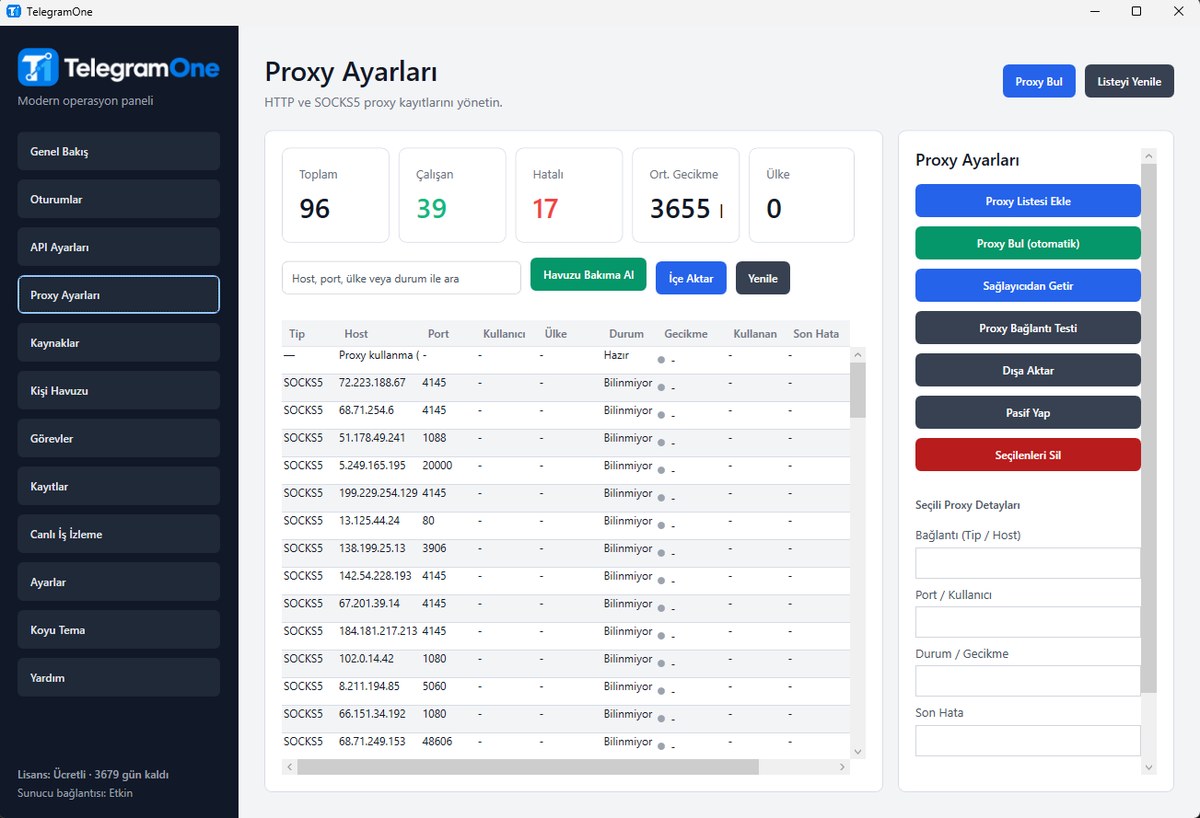
The pool's health at a glance

The proxy screen is a dashboard, not a 300-row table.

TelegraOne proxy pool screen

Summary

Total, working, failing, average latency and how many countries — right at the top. You do not have to read the table to understand the state of the pool.

Quality band

Latency is shown in colour: under a second is green, under three is amber, above that red. A proxy that says "working" but takes five seconds is unusable in practice; the table makes that difference visible.

Usage

How many accounts use each proxy sits in its own column. You see piling up immediately, and proxies that are never used stand out too.

Country

Records coming from a provider carry the country, and it is shown. You can pick exit points close to your audience.

Three ways to fill it

How you fill the pool is up to you.

Find them automatically. The "Find Proxies" button pulls candidates from public lists and tests them all. Nothing to configure, free — the fastest way to start.

Connect your provider. If you have a paid proxy provider, put the address and API key in Settings; "Fetch from Provider" pulls the list along with the country information.

Add them by hand. Paste the HTTP or SOCKS5 proxies you already have, in bulk. Usernames and passwords are supported, and all of them go through the same test.

Let us be honest about free proxies

The software shows you this warning while you use it, too.

What you should know

Public proxies are shared and short-lived; one that works today may not tomorrow. Whoever runs the proxy can also see that a connection exists and where it goes. Because Telegram traffic is encrypted, your message content cannot be read; what is visible is the connection itself, not the content.

Our advice: use a dedicated (paid) proxy for critical accounts, and keep the free pool for trials, warm-up and low-risk work.

Why it is still worth it

The weakness of a free pool is its short life. TelegraOne answers that with constant testing and automatic renewal: the dead are weeded out and replaced. The pool itself changes, but your capacity stays standing.

In short: you do not chase the list, the software does.

Comparison

The proxy routine you are used to, and TelegraOne.

Subject TelegraOne
Finding a proxy list ✓ The software finds them; you do not have to buy a list
Knowing whether one works ✓ Every proxy is tested by connecting to Telegram
Noticing a dead proxy ✓ Regular health checks in the background
Account–proxy assignment ✓ Automatic distribution to the least loaded proxy
When a rate limit hits ✓ The account is moved to another proxy automatically
Pool maintenance ✓ One button: test, weed out the dead, top up what is missing
Quality visibility ✓ Latency colour band, country, usage count, failure reason